

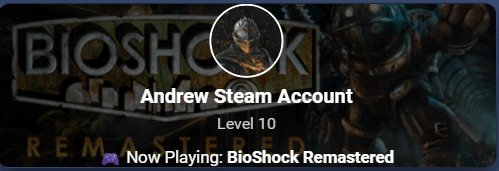
Steam Account Card
A custom Home Assistant button-card that displays a Steam profile with a dynamic game header background, avatar, level, and current game, styled with a dark frosted-glass overlay.
Prerequisites:
- custom:button-card
- Card-Mod
- Steam Integration
note: emoji icons do not copy from the card code
📋
Steam Account Card.yml
custom:button-card
entity: sensor.steam_account
show_icon: false
show_state: false
show_name: false

styles:
  card:
    - position: relative
    - overflow: hidden
    - border-radius: 12px
    - background: rgba(0,0,0,0.6)
    - height: 165px

custom_fields:
  bg: |
    [[[
      if (entity.attributes.game_image_header) {
        return `<div style="background-image:url('${entity.attributes.game_image_header}');
                          background-size:cover;
                          background-position:center;
                          filter: brightness(0.35);
                          position:absolute;
                          top:0;left:0;right:0;bottom:0;
                          z-index:0;"></div>`;
      }
      return "";
    ]]]
  content: |
    [[[
      let game = entity.attributes.game || "";
      let level = entity.attributes.level || "";
      let avatar = entity.attributes.entity_picture || "";
      let name = entity.attributes.friendly_name || "Steam Account";

      return `
        <div style="position:absolute;top:48%;left:50%;transform:translate(-50%,-48%);
                    z-index:1;display:flex;flex-direction:column;
                    align-items:center;gap:6px;text-align:center;">
          <img src="${avatar}" style="width:70px;height:70px;border-radius:50%;border:2px solid #fff;">
          <div style="font-size:1.2em;font-weight:bold;color:#fff;">${name}</div>
          <div style="font-size:0.95em;color:#ccc;">Level ${level}</div>
          ${game ? `<div style="color:#fff;font-size:1em;margin-top:6px;">🎮 Now Playing: <strong>${game}</strong></div>` : ""}
        </div>`;
    ]]]

style:
  custom_fields:
    bg:
      - position: absolute
      - top: 0
      - left: 0
      - right: 0
      - bottom: 0
      - z-index: 0
    content:
      - position: relative
      - z-index: 1

card_mod:
  style: |
    ha-card {
      /* Dark frosted glass */
      background: radial-gradient(120% 140% at 0% 0%,
        rgba(40, 45, 60, 0.42) 0%,
        rgba(14, 16, 24, 0.82) 55%,
        rgba(10, 10, 16, 0.88) 100%) !important;

      backdrop-filter: blur(14px) saturate(135%);
      -webkit-backdrop-filter: blur(14px) saturate(135%);

      border: 1px solid rgba(255,255,255,0.08);
      border-radius: 18px;
      box-shadow: 0 10px 26px rgba(0,0,0,0.60);
      overflow: hidden;
      padding: 12px 12px 10px 12px;
      color: #fff;
    }